> ## Documentation Index
> Fetch the complete documentation index at: https://ngquct-fix-idle-connection-traffic.mintlify.site/llms.txt
> Use this file to discover all available pages before exploring further.
# Connection form
> The four sections of the connection editor and the fields each driver adds
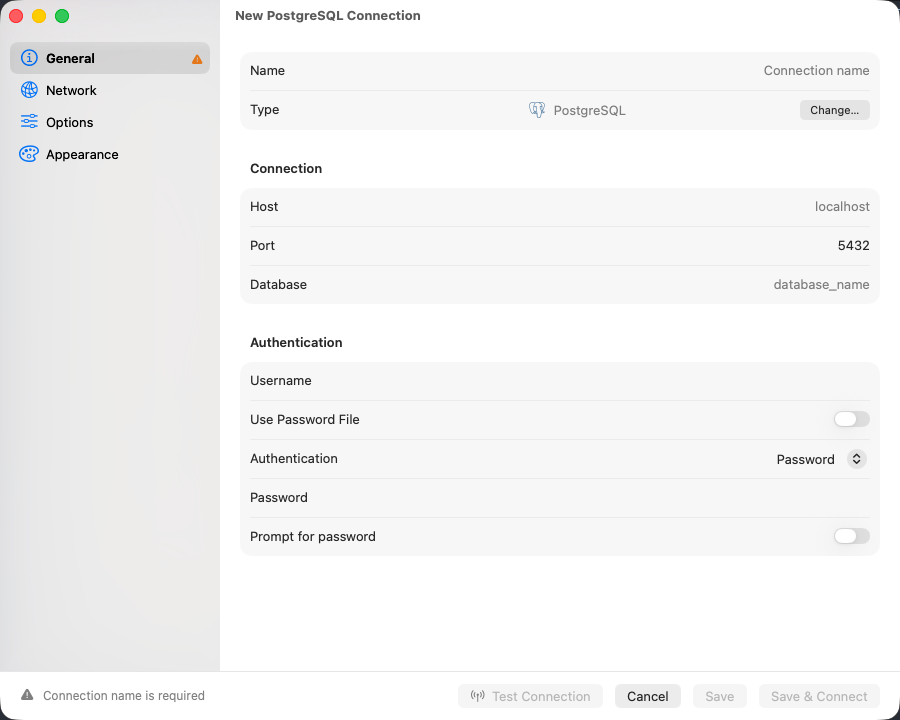
The editor's sidebar lists the same four sections whatever the driver. Only Network is ever absent, and only for a driver that connects directly and cannot negotiate TLS.
 | Section | Contents |
| -------------- | ---------------------------------------------------------------------- |
| **General** | Name, database type, host, port, database, credentials |
| **Network** | How the connection reaches the server, and how it is encrypted |
| **Options** | Driver options, startup SQL, Safe Mode, external and AI access, iCloud |
| **Appearance** | Color, tags, group |
The bar along the bottom carries **Test Connection**, **Cancel** and **Save**. When **Save** is dimmed, the reason sits to its left, prefixed with the tab that holds the empty field.
## General
| Field | Description |
| ----------------------- | ----------------------------------------------------------------------------------------------------------------------------------------------------- |
| **Name** | Display name in the connection list |
| **Type** | The database type. **Change…** retypes the connection and resets the fields the old type owned |
| **Host** | Empty falls back to the driver's own default, usually `localhost` |
| **Port** | Pre-filled from the database type |
| **Database** | Optional on drivers that browse every database from one session. PostgreSQL and Redshift do not connect without one |
| **Username** | Not pre-filled. Empty means the driver's own default |
| **Password** | Stored in the macOS Keychain |
| **Prompt for password** | Stores nothing, asks on every connect. Reads **Prompt for API token** on API-only drivers |
| **Use Password File** | PostgreSQL, Redshift, and CockroachDB. Reads `~/.pgpass`, and reports underneath whether the file exists, has `chmod 0600`, and holds a matching line |
SQLite, DuckDB, and Beancount replace the host fields with a file path picker.
## Network
**Connect via** is a single choice, and the fields under it belong to whichever transport is selected. A connection uses one transport or none.
| Choice | What it does |
| ------------------------ | --------------------------------------------------------------------------------------------------------------------------------------------- |
| **Direct** | Connects straight to the host and port on General |
| **SSH Tunnel** | Forwards a local port through an SSH server. See [SSH Tunneling](/connections/ssh-tunneling) |
| **Remote Database File** | SQLite only. Copies the file from an SSH server and opens the copy read-only. See [Remote Database Files](/connections/remote-database-files) |
| **Cloudflare Tunnel** | Runs `cloudflared access tcp`. See [Cloudflare Tunnel](/connections/cloudflare-tunnel) |
| **Cloud SQL Auth Proxy** | MySQL, PostgreSQL, and SQL Server. See [Cloud SQL Auth Proxy](/connections/cloud-sql-proxy) |
| **SOCKS Proxy** | Routes through a SOCKS5 proxy, which also resolves the hostname. See [SOCKS Proxy](/connections/socks-proxy) |
| **Tunnel Command** | Holds a `kubectl port-forward`, an AWS SSM session, or a command of your own. See [Tunnel Command](/connections/tunnel-command) |
Leave it on **Direct** unless the database is unreachable from this Mac. Switching to another transport keeps what you typed into the previous one, so switching back costs nothing.
**Socket Path**, under **SSH Tunnel**, forwards to a unix socket instead of Host and Port, which are then unused. See [Forwarding to a unix socket](/connections/ssh-tunneling#forwarding-to-a-unix-socket).
Encryption sits below the transport. [SSL/TLS](/connections/ssl) covers the modes and the certificate fields.
## Options
| Field | Description |
| ---------------------- | --------------------------------------------------------------------------------------------------------------------------------------------------------------------------------------------------------------------------------------------------- |
| **Startup Commands** | SQL to run after every connect. See [Startup commands](#startup-commands) |
| **Pre-Connect Script** | Shell script run before connecting. A non-zero exit aborts the connect |
| **Safe Mode** | Confirmation prompts before writes. See [Safe Mode](/features/safe-mode) |
| **AI Policy** | Per-connection override for the in-app AI agents. **Never** also refuses external clients |
| **AI Rules** | Guidance the AI reads on every chat turn for this connection: table conventions, columns to avoid, join hints. See [AI Assistant](/features/ai-assistant) |
| **External Clients** | **Blocked**, **Read Only** (the default), or **Read & Write** for MCP clients such as Raycast, Cursor, and Claude Desktop, and for [AppleScript](/external-api/applescript). A token's own scope cannot raise it. See [External API](/external-api) |
| **Local only** | Keeps this connection off iCloud Sync. See [iCloud Sync](/features/icloud-sync) |
| Plugin fields | Driver-specific options, such as MongoDB's `replicaSet` |
A pre-connect script never runs unprompted. A **Pre-Connect Script** alert shows the script itself and waits for **Run Script**, every time. At launch it is not prompted for at all: a restored window whose connection carries a script waits with a **Connect** button.
## Appearance
**Color** marks the connection in the connection list and its window. **Tags** and **Group** decide where it sits in the welcome window's tree.
## Startup commands
Statements split on semicolons and newlines and run in order on the connection that just opened, after every connect including an automatic reconnect. They all run on one connection, so write one dialect.
```sql MySQL theme={null}
SET time_zone = '+00:00';
SET NAMES utf8mb4;
```
```sql PostgreSQL theme={null}
SET search_path TO myschema, public;
```
A statement that fails is logged and skipped, and the connection still opens.
## Connection health
Every active connection is checked on the interval set by **Check connections** in Settings > General, every 30 seconds by default, and the check is skipped while one of your own queries is running. A failed check starts a reconnect at 2s, then 4s, 8s, doubling to a 120-second ceiling, and keeps going until the connection comes back or you close it. An authentication failure stops the retries and leaves the session in error. A reconnect rebuilds the tunnel, restores the selected database and schema, and re-runs the startup commands; the session reads as connecting throughout.
The check is a query, so on a database that sleeps when idle or bills per query it is not free. **Only when I use the connection** stops it: TablePro sends nothing on its own, and instead checks the connection the first time you use it after five quiet minutes. Waking the Mac from sleep counts as a quiet period, so the first thing you do after opening the lid checks too.
A Server Dashboard tab keeps its own refresh running on its own interval, which **Check connections** does not change. Close the tab or set its interval to Off.
SQLite, DuckDB, Beancount, Snowflake, and Teradata are not checked.
Metadata connections, the extra ones TablePro opens to read a database's object list, are closed after 10 minutes unused and reopened on the next read.
## Which drivers get which transports
| Database | Default port | SSH tunnel | SSL/TLS | Cloudflare Tunnel | Cloud SQL Proxy | SOCKS Proxy | Tunnel Command |
| -------------------------------------------- | ------------ | ---------- | ------- | ----------------- | --------------- | ----------- | -------------- |
| [MySQL](/databases/mysql) | 3306 | Yes | Yes | Yes | Yes | Yes | Yes |
| [MariaDB](/databases/mariadb) | 3306 | Yes | Yes | Yes | No | Yes | Yes |
| [PostgreSQL](/databases/postgresql) | 5432 | Yes | Yes | Yes | Yes | Yes | Yes |
| [Amazon Redshift](/databases/redshift) | 5439 | Yes | Yes | Yes | No | Yes | Yes |
| [CockroachDB](/databases/cockroachdb) | 26257 | Yes | Yes | Yes | No | Yes | Yes |
| [PGlite](/databases/pglite) | 5432 | No | No | No | No | No | No |
| [Microsoft SQL Server](/databases/mssql) | 1433 | Yes | Yes | Yes | Yes | Yes | Yes |
| [Oracle](/databases/oracle) | 1521 | Yes | Yes | Yes | No | Yes | Yes |
| [Dameng DM8](/databases/dameng) | 5236 | Yes | No | Yes | No | Yes | Yes |
| [ClickHouse](/databases/clickhouse) | 8123 | Yes | Yes | Yes | No | Yes | Yes |
| [Teradata](/databases/teradata) | 1025 | Yes | Yes | Yes | No | Yes | Yes |
| [Trino](/databases/trino) | 8080 | Yes | Yes | Yes | No | Yes | Yes |
| [MongoDB](/databases/mongodb) | 27017 | Yes | Yes | Yes | No | Yes | Yes |
| [Redis](/databases/redis) | 6379 | Yes | Yes | Yes | No | Yes | Yes |
| [Cassandra / ScyllaDB](/databases/cassandra) | 9042 | Yes | Yes | Yes | No | Yes | Yes |
| [etcd](/databases/etcd) | 2379 | Yes | Yes | Yes | No | Yes | Yes |
| [SurrealDB](/databases/surrealdb) | 8000 | Yes | Yes | Yes | No | Yes | Yes |
| [Elasticsearch](/databases/elasticsearch) | 9200 | No | Yes | No | No | No | No |
| [Typesense](/databases/typesense) | 8108 | No | Yes | No | No | No | No |
| [Snowflake](/databases/snowflake) | 443 | No | No | No | No | No | No |
| [SQLite](/databases/sqlite) | File | No | No | No | No | No | No |
| [DuckDB](/databases/duckdb) | File | No | No | No | No | No | No |
| [Beancount](/databases/beancount) | File | No | No | No | No | No | No |
| [DynamoDB](/databases/dynamodb) | AWS API | No | No | No | No | No | No |
| [BigQuery](/databases/bigquery) | Cloud API | No | No | No | No | No | No |
| [Cloudflare D1](/databases/cloudflare-d1) | Cloud API | No | No | No | No | No | No |
| [libSQL / Turso](/databases/libsql) | URL | No | No | No | No | No | No |
SQLite is the one driver offering **Remote Database File**; it reaches an SSH server without forwarding a port. A driver with no SSL/TLS column is either a local file or an HTTPS API that manages its own encryption. [SSL/TLS](/connections/ssl) has the per-driver defaults.
| Section | Contents |
| -------------- | ---------------------------------------------------------------------- |
| **General** | Name, database type, host, port, database, credentials |
| **Network** | How the connection reaches the server, and how it is encrypted |
| **Options** | Driver options, startup SQL, Safe Mode, external and AI access, iCloud |
| **Appearance** | Color, tags, group |
The bar along the bottom carries **Test Connection**, **Cancel** and **Save**. When **Save** is dimmed, the reason sits to its left, prefixed with the tab that holds the empty field.
## General
| Field | Description |
| ----------------------- | ----------------------------------------------------------------------------------------------------------------------------------------------------- |
| **Name** | Display name in the connection list |
| **Type** | The database type. **Change…** retypes the connection and resets the fields the old type owned |
| **Host** | Empty falls back to the driver's own default, usually `localhost` |
| **Port** | Pre-filled from the database type |
| **Database** | Optional on drivers that browse every database from one session. PostgreSQL and Redshift do not connect without one |
| **Username** | Not pre-filled. Empty means the driver's own default |
| **Password** | Stored in the macOS Keychain |
| **Prompt for password** | Stores nothing, asks on every connect. Reads **Prompt for API token** on API-only drivers |
| **Use Password File** | PostgreSQL, Redshift, and CockroachDB. Reads `~/.pgpass`, and reports underneath whether the file exists, has `chmod 0600`, and holds a matching line |
SQLite, DuckDB, and Beancount replace the host fields with a file path picker.
## Network
**Connect via** is a single choice, and the fields under it belong to whichever transport is selected. A connection uses one transport or none.
| Choice | What it does |
| ------------------------ | --------------------------------------------------------------------------------------------------------------------------------------------- |
| **Direct** | Connects straight to the host and port on General |
| **SSH Tunnel** | Forwards a local port through an SSH server. See [SSH Tunneling](/connections/ssh-tunneling) |
| **Remote Database File** | SQLite only. Copies the file from an SSH server and opens the copy read-only. See [Remote Database Files](/connections/remote-database-files) |
| **Cloudflare Tunnel** | Runs `cloudflared access tcp`. See [Cloudflare Tunnel](/connections/cloudflare-tunnel) |
| **Cloud SQL Auth Proxy** | MySQL, PostgreSQL, and SQL Server. See [Cloud SQL Auth Proxy](/connections/cloud-sql-proxy) |
| **SOCKS Proxy** | Routes through a SOCKS5 proxy, which also resolves the hostname. See [SOCKS Proxy](/connections/socks-proxy) |
| **Tunnel Command** | Holds a `kubectl port-forward`, an AWS SSM session, or a command of your own. See [Tunnel Command](/connections/tunnel-command) |
Leave it on **Direct** unless the database is unreachable from this Mac. Switching to another transport keeps what you typed into the previous one, so switching back costs nothing.
**Socket Path**, under **SSH Tunnel**, forwards to a unix socket instead of Host and Port, which are then unused. See [Forwarding to a unix socket](/connections/ssh-tunneling#forwarding-to-a-unix-socket).
Encryption sits below the transport. [SSL/TLS](/connections/ssl) covers the modes and the certificate fields.
## Options
| Field | Description |
| ---------------------- | --------------------------------------------------------------------------------------------------------------------------------------------------------------------------------------------------------------------------------------------------- |
| **Startup Commands** | SQL to run after every connect. See [Startup commands](#startup-commands) |
| **Pre-Connect Script** | Shell script run before connecting. A non-zero exit aborts the connect |
| **Safe Mode** | Confirmation prompts before writes. See [Safe Mode](/features/safe-mode) |
| **AI Policy** | Per-connection override for the in-app AI agents. **Never** also refuses external clients |
| **AI Rules** | Guidance the AI reads on every chat turn for this connection: table conventions, columns to avoid, join hints. See [AI Assistant](/features/ai-assistant) |
| **External Clients** | **Blocked**, **Read Only** (the default), or **Read & Write** for MCP clients such as Raycast, Cursor, and Claude Desktop, and for [AppleScript](/external-api/applescript). A token's own scope cannot raise it. See [External API](/external-api) |
| **Local only** | Keeps this connection off iCloud Sync. See [iCloud Sync](/features/icloud-sync) |
| Plugin fields | Driver-specific options, such as MongoDB's `replicaSet` |
A pre-connect script never runs unprompted. A **Pre-Connect Script** alert shows the script itself and waits for **Run Script**, every time. At launch it is not prompted for at all: a restored window whose connection carries a script waits with a **Connect** button.
## Appearance
**Color** marks the connection in the connection list and its window. **Tags** and **Group** decide where it sits in the welcome window's tree.
## Startup commands
Statements split on semicolons and newlines and run in order on the connection that just opened, after every connect including an automatic reconnect. They all run on one connection, so write one dialect.
```sql MySQL theme={null}
SET time_zone = '+00:00';
SET NAMES utf8mb4;
```
```sql PostgreSQL theme={null}
SET search_path TO myschema, public;
```
A statement that fails is logged and skipped, and the connection still opens.
## Connection health
Every active connection is checked on the interval set by **Check connections** in Settings > General, every 30 seconds by default, and the check is skipped while one of your own queries is running. A failed check starts a reconnect at 2s, then 4s, 8s, doubling to a 120-second ceiling, and keeps going until the connection comes back or you close it. An authentication failure stops the retries and leaves the session in error. A reconnect rebuilds the tunnel, restores the selected database and schema, and re-runs the startup commands; the session reads as connecting throughout.
The check is a query, so on a database that sleeps when idle or bills per query it is not free. **Only when I use the connection** stops it: TablePro sends nothing on its own, and instead checks the connection the first time you use it after five quiet minutes. Waking the Mac from sleep counts as a quiet period, so the first thing you do after opening the lid checks too.
A Server Dashboard tab keeps its own refresh running on its own interval, which **Check connections** does not change. Close the tab or set its interval to Off.
SQLite, DuckDB, Beancount, Snowflake, and Teradata are not checked.
Metadata connections, the extra ones TablePro opens to read a database's object list, are closed after 10 minutes unused and reopened on the next read.
## Which drivers get which transports
| Database | Default port | SSH tunnel | SSL/TLS | Cloudflare Tunnel | Cloud SQL Proxy | SOCKS Proxy | Tunnel Command |
| -------------------------------------------- | ------------ | ---------- | ------- | ----------------- | --------------- | ----------- | -------------- |
| [MySQL](/databases/mysql) | 3306 | Yes | Yes | Yes | Yes | Yes | Yes |
| [MariaDB](/databases/mariadb) | 3306 | Yes | Yes | Yes | No | Yes | Yes |
| [PostgreSQL](/databases/postgresql) | 5432 | Yes | Yes | Yes | Yes | Yes | Yes |
| [Amazon Redshift](/databases/redshift) | 5439 | Yes | Yes | Yes | No | Yes | Yes |
| [CockroachDB](/databases/cockroachdb) | 26257 | Yes | Yes | Yes | No | Yes | Yes |
| [PGlite](/databases/pglite) | 5432 | No | No | No | No | No | No |
| [Microsoft SQL Server](/databases/mssql) | 1433 | Yes | Yes | Yes | Yes | Yes | Yes |
| [Oracle](/databases/oracle) | 1521 | Yes | Yes | Yes | No | Yes | Yes |
| [Dameng DM8](/databases/dameng) | 5236 | Yes | No | Yes | No | Yes | Yes |
| [ClickHouse](/databases/clickhouse) | 8123 | Yes | Yes | Yes | No | Yes | Yes |
| [Teradata](/databases/teradata) | 1025 | Yes | Yes | Yes | No | Yes | Yes |
| [Trino](/databases/trino) | 8080 | Yes | Yes | Yes | No | Yes | Yes |
| [MongoDB](/databases/mongodb) | 27017 | Yes | Yes | Yes | No | Yes | Yes |
| [Redis](/databases/redis) | 6379 | Yes | Yes | Yes | No | Yes | Yes |
| [Cassandra / ScyllaDB](/databases/cassandra) | 9042 | Yes | Yes | Yes | No | Yes | Yes |
| [etcd](/databases/etcd) | 2379 | Yes | Yes | Yes | No | Yes | Yes |
| [SurrealDB](/databases/surrealdb) | 8000 | Yes | Yes | Yes | No | Yes | Yes |
| [Elasticsearch](/databases/elasticsearch) | 9200 | No | Yes | No | No | No | No |
| [Typesense](/databases/typesense) | 8108 | No | Yes | No | No | No | No |
| [Snowflake](/databases/snowflake) | 443 | No | No | No | No | No | No |
| [SQLite](/databases/sqlite) | File | No | No | No | No | No | No |
| [DuckDB](/databases/duckdb) | File | No | No | No | No | No | No |
| [Beancount](/databases/beancount) | File | No | No | No | No | No | No |
| [DynamoDB](/databases/dynamodb) | AWS API | No | No | No | No | No | No |
| [BigQuery](/databases/bigquery) | Cloud API | No | No | No | No | No | No |
| [Cloudflare D1](/databases/cloudflare-d1) | Cloud API | No | No | No | No | No | No |
| [libSQL / Turso](/databases/libsql) | URL | No | No | No | No | No | No |
SQLite is the one driver offering **Remote Database File**; it reaches an SSH server without forwarding a port. A driver with no SSL/TLS column is either a local file or an HTTPS API that manages its own encryption. [SSL/TLS](/connections/ssl) has the per-driver defaults.